
The lights flicker. Your power station detects the outage and switches to battery mode. Your router stays online. Your monitor is fine. But your desktop PC — the one running unsaved work — reboots anyway.
Welcome to the transfer-time problem. A large battery can power a desk for hours and still let the PC restart during the switch. The deciding number is the interruption in milliseconds, not battery capacity. Compare it with the attached equipment's tolerance before choosing a UPS, a power station, or both.
The short answer: UPS transfer time is the interruption while a backup switches from utility power to battery-backed output. An online UPS has no transfer interruption in normal double-conversion operation. Standby and line-interactive UPS times depend on the model and settings; the examples below range from 2–10ms. The power stations in this guide advertise 10ms, 20ms, or 30ms-class switching, with a conditional 0ms claim on the Apex 300. A shorter delay gives sensitive equipment more margin, but no number alone guarantees that your PC, router, or NAS will stay on.
Jump to: UPS types and transfer times, power-station transfer times by model, or what is a good UPS transfer time for a PC?.
Corrected October 15, 2026: added manufacturer citations and clarified standby UPS timings, online UPS operation, and ATX 3.1 hold-up time. Earlier copy treated 16–20ms as a general desktop tolerance and 10–15ms as a universal standby UPS range; neither is a safe assumption. We have not measured these products' transfer times.
UPS Transfer Time (Switchover Time) Explained: The Reboot Window
UPS transfer time, also called switchover or switching time, is measured in milliseconds (ms). It describes a change in power source, not how long the battery will run your equipment. These manufacturer examples show why the exact model and operating mode matter:
| Backup type / example | Published transfer time | What to check |
|---|---|---|
| Online double-conversion: APC SRT family | No transfer time in normal online operation | Bypass and energy-saving modes can behave differently; check the manual |
| Line-interactive: APC SMC, SCL, SMX, SMT, SMTL | 2–4ms high sensitivity; 6–8ms medium; 8–10ms low | Lower sensitivity increases the transfer time |
| Standby: CyberPower ST900U | 8ms typical | A typical figure is not a published worst-case limit |
| Power station: SOLIX C1000 Gen 2 / DELTA Pro 3 | 10ms advertised | Confirm the exact generation, outlet, and supported load |
| Power station: Jackery Explorer 1000 v2 | 20ms class, advertised | Compare with your equipment's hold-up time |
| Power station: EcoFlow RIVER 2 Pro | Under 30ms advertised | Do not assume a desktop or NAS can bridge the interruption |
Sources checked October 15, 2026: APC transfer-time FAQ and CyberPower ST900U specifications. Power-station sources are below.
Hold-up time is the other half of the comparison. It is how long a device's power supply can maintain output after input power disappears. Seasonic's ATX comparison lists 17ms at full load for ATX 3.0, but 12ms at full load for ATX 3.1, with 17ms at 80% load recommended. Actual PSU performance varies. For an illustrative 12ms hold-up and a 10ms transfer, the arithmetic leaves only 2ms of margin; a 20ms transfer exceeds that hold-up by 8ms. Those are comparisons, not measured results for your PC.
How True UPS Systems Work
A traditional uninterruptible power supply (UPS) uses one of three topologies:
Online/double-conversion UPS: In normal online operation, the load is continuously supplied by the inverter. Utility power feeds the DC stage; the battery supplies that stage when utility power fails. The load does not need to switch to a different output source. This explains the 0ms transfer figure without implying that the battery constantly discharges.
Line-interactive UPS: The unit regulates utility power and transfers to its battery-backed inverter when necessary. Transfer time is model- and setting-specific; APC's cited families list 2–10ms across sensitivity settings.
Standby/offline UPS: The unit switches to its inverter after a utility failure. It is not automatically a 10–15ms device: CyberPower's ST900U lists 8ms typical. Compare the published specification rather than assuming a range from the topology name.
The critical comparison is the backup's transfer time against the connected equipment's hold-up time at the intended load. A laptop's working internal battery can bridge an interruption, but external monitors and networking equipment need their own assessment.
How Power Station "UPS Mode" Works
In a common pass-through arrangement, utility AC supplies the connected equipment while the station charges its battery. When utility power fails, the station switches to its inverter. The interruption depends on the model and operating mode; it is separate from AC output wattage and battery capacity.
Why Marketing Calls It UPS Mode Anyway
A "UPS" or "EPS" label does not establish a universal transfer-time limit, compatibility with your equipment, or support for automatic shutdown. Read the exact model's specification and manual. Some power stations advertise 10ms switching; others advertise 20ms or under 30ms. Conditional 0ms operation needs a closer check of the supported outlets and mode.
A laptop's working internal battery can bridge an AC interruption. Routers, monitors, desktop PCs, and NAS units depend on their own power supplies and cannot be grouped under one safe delay. For a CPAP or other medical device, follow the device manufacturer's backup-power requirements rather than assuming that a brief interruption is acceptable.
Advertised Transfer Time vs Measured Performance
The figures below are manufacturer claims, not Trek4Tech measurements. EcoFlow's DELTA 3 page, for example, qualifies its performance claims with internal-testing conditions. That does not establish the worst-case interruption for your particular equipment and load.
A controlled, manufacturer-supported outage check with noncritical equipment can reveal a reboot. It does not measure the output waveform or prove that every future outage will behave identically. Save work first; do not use critical data or medical equipment as a test load.
When Each Solution Wins
Traditional UPS: The 5-Minute Shutdown Window
Pros
- Published transfer-time specifications; shutdown support on compatible models
- Clean sine wave output (on pure sine models)
- Battery replacement cycles keep upfront cost low
- Desktop/tower models fit under desks, out of sight
Cons
- Runtime typically 5-15 minutes at full load
- Lead-acid batteries degrade in 3-5 years
- No solar recharge option
- Limited to stationary use
- Alarm beeps can't always be disabled
Best for: Desktop PC, home server, NAS, cable modem + router combo where you need 5-15 minutes to save work and execute a clean shutdown. Not for extended outages.
Power Station: The Multi-Hour (or Multi-Day) Backup
Pros
- Runtime measured in hours or days, not minutes
- LiFePO4 chemistry: 3000-6000 cycle lifespan
- Solar recharging for off-grid or extended outages
- Portable: use for camping, job sites, emergency evacuation
- Powers high-draw devices (refrigerators, power tools, heaters)
Cons
- Transfer delay can exceed the connected equipment's hold-up time
- Higher upfront cost ($600-$3000+)
- Heavier (25-115 lbs for 1-4 kWh models)
- Pass-through charging generates heat, may reduce cycle life
Best for: Whole-desk backup including monitors, external drives, lighting, phone chargers, and devices that tolerate brief switchover gaps. Extended outage preparedness. Dual use for camping or outdoor work.
The Hybrid Setup: Belt and Suspenders
Choose the backup around the job it needs to do:
Wall → UPS → desktop PC + NAS
Size the UPS for the equipment's wattage and the time needed to save work or shut down. Check its transfer specification and any supported USB/network shutdown integration. Runtime comes from the selected UPS's load chart.
Wall → power station → equipment that tolerates its transfer delay
A larger battery can extend runtime for networking, lighting, and other supported loads. Check each device's requirements rather than assuming every desk accessory tolerates 20–30ms.
Can the UPS plug into the power station? Only use this arrangement when both manufacturers support it. The station must handle the UPS's input, including its connected load and battery recharge demand, within its continuous and bypass limits. Input waveform, frequency, and UPS sensitivity can also affect whether the UPS accepts the station. A compatible UPS can bridge the station's interruption, but this is not a universal guarantee of uninterrupted operation.
UPS Transfer Time by Power Station Model: 0ms, 10ms, 20ms, 30ms
This table separates advertised switching from unknown specifications. We have not measured these transfer times. Rechecked sources are linked in the table; the Apex 300 entry remains the September 2026 claim and needs an outlet/mode check in the applicable manual.
| Station | Advertised transfer time | Source and limitation |
|---|---|---|
| Bluetti Apex 300 | 0ms or 20ms, conditional | September 2026 product-page claim; confirm the applicable outlets and mode in the regional manual |
| EcoFlow DELTA Pro 3 | 10ms | EcoFlow product page; checked October 15, 2026 |
| EcoFlow DELTA 3 | Under 10ms on product page | EcoFlow product page; checked October 15, 2026 |
| Anker SOLIX C1000 Gen 2 | 10ms | Anker user guide; checked October 15, 2026; do not confuse with Gen 1 |
| Jackery Explorer 1000 v2 | Within 20ms | Jackery support; checked October 15, 2026; confirm your regional model |
| EcoFlow RIVER 2 Pro | Under 30ms | EcoFlow product page; checked October 15, 2026 |
| EcoFlow DELTA 2 Max | Not established here | Check the exact model's manual; do not substitute a DELTA 2-family figure |
| Goal Zero Yeti 1500 | Not established here | Check the exact model's manual before relying on automatic transfer |
| Spec | Anker SOLIX C1000 Gen 2 | EcoFlow Delta Pro 3 | Bluetti Apex 300 | EcoFlow DELTA 3 Portable Power Station |
|---|---|---|---|---|
| Capacity | 1024 Wh | 4096 Wh | 2764 Wh | 1024 Wh |
| Continuous Output | 2000 W | 4000 W | 3840 W | 1800 W |
| Surge Output | 3000 W | 8000 W | 7680 W | 3600 W |
| Weight | 24.9 lbs | 113.5 lbs | 81.6 lbs | 27.6 lbs |
| Battery Chemistry | LiFePO4 | LiFePO4 | LiFePO4 | LiFePO4 |
| Cycle Life | 4000 cycles | 4000 cycles | 6000 cycles | 4000 cycles |
| Recharge Time | 49 min | 60 min | ~92 min calculated minimum (included 1800W cable); actual full charge takes longer | 56 min |
| Max Solar Input | 600 W | 2600 W | 2400 W | 500 W |
| Outlets | 6 AC · 1 Car · 2 USB-A · 2 USB-C | — | — | — |
Where the tiers decide a purchase between two popular 1,000Wh units, the head-to-heads put switchover next to runtime and recharge: Delta 3 vs Jackery 1000 v2 (under 10ms vs ~20ms) and C1000 Gen 2 vs Jackery 1000 v2 (10ms vs ~20ms).
Reading the Tiers
0ms: check the operating mode. An online UPS supplies the load continuously through its inverter in normal operation. A power station's conditional 0ms claim needs the specified outlet and mode; do not apply it to every outlet or configuration.
10ms: compare with the actual PSU. DELTA 3, DELTA Pro 3, and C1000 Gen 2 are candidates for a shorter advertised gap. A smaller gap leaves more margin, but a published figure does not establish the worst-case performance of your setup.
20ms: do not assume desktop compatibility. Check the equipment's hold-up specification at the intended load. A laptop with a working battery has a separate way to bridge the gap; a desktop, router, or monitor may not.
30ms: extended runtime does not eliminate the interruption. RIVER 2 Pro's under-30ms EPS claim is a reason to check device tolerance carefully, regardless of how many hours its battery could supply afterward.
The Verification Checklist
Before relying on a power station as your sole UPS replacement:
- Find the exact model's manual: Check transfer time, supported outlets, operating mode, bypass limits, and any typical-versus-maximum qualifier.
- Check the connected equipment: Use its PSU specification or a credible measured hold-up result at a relevant load. An efficiency certification alone does not establish hold-up time.
- Check shutdown support: For a PC or NAS, confirm the supported communication connection and shutdown software. A power station's battery percentage is not automatically available to the NAS.
- Validate a supported setup: Save work and use a noncritical load for any outage check permitted by the manufacturer. Keep automatic shutdown configured where supported.
An unpublished transfer time is unknown. Do not substitute an assumed 20–30ms figure.
Pass-Through Charging: The Hidden Trade-Off
Pass-through does not necessarily mean the battery continuously charges and discharges: the power path depends on the design and mode. Follow the manufacturer's continuous-load, charging, ventilation, and temperature limits. We do not have measured aging data that supports a universal percentage reduction in battery life from UPS use.
FAQ
What is UPS transfer time?
UPS transfer time is the interruption when a backup changes from utility power to battery-backed output, measured in milliseconds. It is also called switchover or switching time. Battery runtime is a different measurement: how long the backup can supply the load after the switch.
What is a good UPS transfer time for a PC?
Choose a transfer time shorter than your PC power supply's hold-up time at the intended load, with margin. A shorter delay is preferable, but 10ms is not a universal compatibility guarantee. An online double-conversion UPS has no transfer interruption in normal online operation; standby and line-interactive timings depend on the model and settings.
Is 20ms fast enough for a UPS?
Only if the connected equipment can bridge that interruption. A 20ms transfer can exceed a desktop PSU's hold-up time and cause a restart. Do not assume that a router, NAS, or CPAP will tolerate it. Check the exact equipment's requirements and the backup's specified operating mode.
Will my desktop PC survive a 20-30ms switchover?
Possibly, but do not rely on a general desktop tolerance. Check your PSU model's hold-up specification or independent measurements at a relevant load. If that information is unavailable, choose a UPS specified for the equipment and configure supported shutdown rather than treating a power station's advertised transfer time as proof that the PC will stay on.
Is EPS mode the same as UPS mode?
The labels alone do not establish equivalent performance. Both can describe automatic battery backup, but transfer time, bypass behavior, supported loads, and shutdown communication vary. Compare the exact model's manual rather than choosing by the UPS or EPS label.
Can I run a NAS on a power station during an outage?
A suitably rated station can supply power, but continuous operation through the initial transfer depends on the NAS and its power supply. Check the NAS manufacturer's supported UPS list and shutdown integration. Do not assume the NAS can read a station's battery level or shut down automatically without a supported communication connection.
Does pass-through charging degrade the battery faster?
The effect depends on the power path, temperature, charge settings, and actual battery cycling. We have no measured basis for assigning a universal cycle-life penalty. Follow the manufacturer's ventilation and operating limits, especially while charging and powering a load together.
Can I plug a UPS into a power station?
Only when both manufacturers support the arrangement. Account for the connected equipment and UPS battery recharge demand within the station's output and bypass limits. A compatible UPS may bridge the station's transfer gap, but input waveform, frequency, and sensitivity settings can affect whether it accepts that source. There is no universal no-reboot guarantee.
Is there a 0ms UPS power station?
Bluetti advertises conditional 0ms or 20ms operation for the Apex 300. Check the applicable regional manual for the required outlets and operating mode. We have not measured it. If no interruption is required, compare an online double-conversion UPS's normal operating specification and its bypass behavior as well.
Which power stations have a 10ms UPS?
Among the models we track, EcoFlow advertises 10ms for DELTA Pro 3 and under 10ms on the DELTA 3 product page. Anker specifies 10ms for the SOLIX C1000 Gen 2. These are manufacturer figures, not our measurements, and do not establish compatibility with every PC or NAS. Check the generation: C1000 Gen 1 is a different product.
Which Should You Buy?
Choose a conventional UPS for desktop or NAS shutdown protection. A power station adds energy for longer outages, but its switching specification alone does not establish compatibility with your equipment. Check supported operating modes, transfer requirements, and shutdown support before choosing.
If you need to protect a single desktop PC or NAS for clean shutdown: Buy a traditional line-interactive UPS rated for 10-15 minutes at your device's wattage. Cost: $100-$300. CyberPower and APC dominate this category. You don't need a power station.
If you want whole-desk backup for work-from-home with extended outages (2-8 hours) and your desktop can tolerate a reboot: The Anker SOLIX C1000 Gen 2 (last checked $499.99 · checked Oct 26, 2026 · see on Amazon) offers the best balance of capacity (1024Wh), output (2000W), and recharge speed (49 minutes). Run your router, modem, monitors, and lighting. Anker advertises a 10ms switchover on this unit — compare that with your equipment's requirements before relying on it.
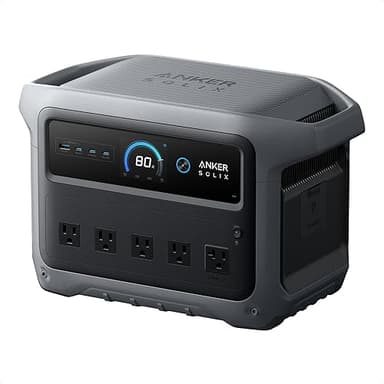
If you need extended backup for a desktop PC or NAS: Choose a UPS with suitable transfer specifications and supported shutdown, plus the Anker SOLIX C1000 Gen 2 (last checked $499.99 · checked Oct 26, 2026 · see on Amazon) for everything else. Only connect the UPS to the station if both manufacturers support the arrangement.
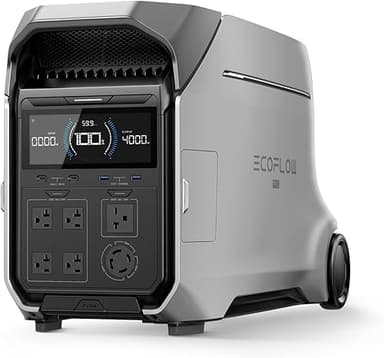
If you're planning whole-home backup or off-grid use beyond a desk: The EcoFlow Delta Pro 3 (no recently verified in-stock offer) scales to 4096Wh with 4000W output, subject to each appliance's running draw, startup surge, and manufacturer requirements. Pair with solar panels for multi-day outages. Still recommend a separate UPS for desktop computers and network equipment.
Match transfer time to equipment tolerance first, then size battery runtime. A larger power station can extend an outage backup, but capacity cannot compensate for an interruption that makes the connected equipment restart.