
Your power station has all the right ports. USB-C for your laptop, a 12V socket for the cooler, four AC outlets for everything else. You plug in your gear, and nothing works the way you expected. The laptop charges slower than from the wall. The tire inflator trips the 12V port. Two kitchen appliances together kill the AC side. The problem isn't the port shape — it's the wattage each port actually delivers. Here's how to read power station port wattage limits before you rely on them in the field.
The one-line answer: check three numbers, not the port shapes — the USB-C port's PD wattage tier (15-140W, identical connector), the 12V socket's 120W fuse, and the single inverter ceiling that every AC outlet shares.
USB-C Ports: The Connector Shape Says Nothing About Wattage
USB-C Power Delivery (PD) is a standard with tiers: 15W, 27W, 45W, 60W, 100W, and 140W. The physical connector is identical across all tiers. A USB-C port on a power station might deliver 100W — or it might cap at 30W. The spec sheet must state the PD wattage explicitly.
Fast laptop charging requires 60W minimum for most ultrabooks, 100W for performance laptops, and 140W for 16-inch MacBook Pros and mobile workstations. If your power station's USB-C port maxes out at 60W and your laptop pulls 100W, one of two things happens: the laptop charges slowly, or it discharges while you work because the incoming 60W can't keep up with the processor load.
How to Read USB-C Specs
Look for "USB-C PD 100W" or "USB-C Power Delivery 100W" in the spec table. If the sheet just says "USB-C" or "USB-C QC" (Quick Charge), assume 18–30W — fine for phones and tablets, but not enough for a 100W USB-C PD laptop.
Many budget and mid-range stations cap USB-C at 60W. That's enough for an iPad Pro or a 13-inch laptop on light tasks, but not for sustained work on a 15-inch machine. Check your laptop's OEM charger: the wattage is printed on the brick.
12V Car Sockets: 120W Ceiling, Unregulated Voltage, Unhappy Fridges
The 12V cigarette-lighter socket on most power stations is fused at 10A, which yields 120W maximum (10A × 12V). Many car-style accessories exceed that: a dual-piston tire inflator pulls 150–180W, a 45L compressor cooler can spike to 150W on startup, and a 400W car-socket inverter will immediately trip the port.
If your accessory draws more than 120W, the port's circuit breaker trips, or the device runs at reduced power and overheats. Some stations list the 12V port limit as "10A max" or "120W max" — others bury it in fine print or omit it entirely.
Regulated vs. Unregulated 12V Ports
Cheaper power stations use unregulated 12V outputs: as the internal battery drains from 100% to 20%, the port voltage sags from 13V down to 11V or lower. Compressor fridges with low-voltage cutoffs (often 11.5V or 12V) will shut down prematurely, even though the power station still has 30–40% capacity remaining.
Regulated 12V ports hold 12.0–12.5V across the entire discharge curve. The spec sheet will say "regulated 12V" if it's present — if it's silent, assume unregulated. This matters for sensitive 12V gear like CPAP machines and absorption fridges.
The 12V car-port limit is a hard ceiling; no firmware update or adapter will raise it. If your gear needs more than 120W, use an AC outlet and the device's wall adapter instead.
AC Outlets: One Inverter, Shared Ceiling, Four Plug Shapes
A power station with four AC outlets and a 1,800W inverter delivers 1,800W total across all four outlets combined, not 1,800W per outlet. Plug a 1,200W kettle and a 900W space heater into two different outlets, and you've asked for 2,100W — the inverter shuts down to protect itself.
This is the single most common user error. The outlet count is a convenience feature (so you don't need a power strip), not a capacity multiplier. The spec sheet will list "AC output" or "continuous power" — that number is your total budget for everything plugged into AC at once.
Surge vs. Running Watts Add Another Layer
Most motorized appliances (fridge compressors, power tools, blenders) draw 2–4× their running wattage for 1–3 seconds at startup. A circular saw rated 1,500W running might pull 3,000W for one second when you pull the trigger. If your power station's surge rating is 2,400W, the saw trips the inverter before the blade spins.
The total AC output number is the continuous ceiling; surge watts is the brief spike ceiling. Both matter. For a detailed breakdown of how startup surge interacts with continuous load, see our guide on surge watts vs running watts.
Reading Spec Sheets: The Per-Port Wattage Checklist
A complete spec sheet includes a port-by-port breakdown. Here's what to verify before you buy or pack:
- USB-C PD wattage — stated explicitly as "USB-C PD 100W," not just "USB-C."
- 12V port amperage — "12V/10A" means 120W max; "12V/15A" means 180W max (rare but exists on larger units).
- 12V regulation — look for "regulated 12V output" if you're running fridges or medical gear.
- AC continuous watts — the total shared across all AC outlets.
- AC surge watts — the brief peak the inverter can handle for motor startups.
- Per-port USB-A wattage — older 5V/2.4A ports max out at 12W; newer ones can do 18W with Quick Charge 3.0.
If the manufacturer omits any of these, contact support or assume conservative numbers (30W for USB-C, 10A for 12V, no regulation).
Comparing Real-World Port Specs
| Spec | Anker SOLIX C1000 Gen 2 | Jackery Explorer 1000 v2 | EcoFlow River 2 Pro Solar Generator (220W) | EcoFlow DELTA 3 Portable Power Station |
|---|---|---|---|---|
| Capacity | 1024 Wh | 1070 Wh | 768 Wh | 1024 Wh |
| Continuous Output | 2000 W | 1500 W | 800 W | 1800 W |
| Surge Output | 3000 W | 3000 W | 1600 W | 3600 W |
| Weight | 24.9 lbs | 23.8 lbs | — | 27.6 lbs |
| Battery Chemistry | LiFePO4 | LiFePO4 | LiFePO4 | LiFePO4 |
| Cycle Life | 4000 cycles | 4000 cycles | — | 4000 cycles |
| Recharge Time | 49 min | 60 min | — | 56 min |
| Max Solar Input | 600 W | 400 W | — | 500 W |
| Included Panel | — | — | 220 W | — |
| Outlets | 6 AC · 1 Car · 2 USB-A · 2 USB-C | — | — | — |
The table above compares the headline specs, but per-port USB-C and 12V wattage limits are often published only in downloadable manuals — which is exactly the point of this article. Total AC output is the number every listing leads with: the Anker SOLIX C1000 Gen 2 (last checked $699.99 · checked Oct 19, 2026 · see on Amazon) delivers 2,000W continuous (3,000W surge), the EcoFlow Delta 3 (last checked $629.00 · checked Oct 19, 2026 · see on Amazon) 1,800W (3,600W surge), and the compact EcoFlow River 2 Pro (last checked $719.00 · checked Oct 19, 2026 · see on Amazon) 800W (1,600W surge) — a ceiling that already rules out microwaves and full-size fridges regardless of how many outlets it carries.
Per-port USB-C PD wattage and 12V regulation are a different story: manufacturers document them inconsistently, and product pages frequently omit them. Download the manufacturer's full manual PDF before you depend on a port in the field — the product page rarely lists per-port limits.
Match the Port to the Load
Check your gear's actual draw before you assume a port will work:
- Laptops — find the OEM charger wattage (printed on the brick). Match or exceed it with a USB-C PD port.
- 12V coolers — most draw 45–60W running, but spike to 120–150W on compressor startup. Verify your power station's 12V port is rated for at least 10A (120W).
- AC kitchen appliances — add the wattages of everything you plan to run at once. A 1,200W coffee maker plus a 600W toaster equals 1,800W — that's the full budget on many mid-size stations.
- Power tools — check both running and startup watts. A miter saw might list 15A on the nameplate: 15A × 120V = 1,800W running, but it can surge to 3,600W for a fraction of a second.
If a device's demand exceeds a port's limit, the port either trips (circuit breaker), throttles (delivers reduced power and the device complains), or the power station shuts down entirely to protect the battery.
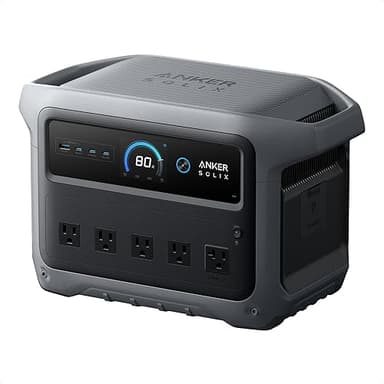
The Anker SOLIX C1000 Gen 2 (last checked $699.99 · checked Oct 19, 2026 · see on Amazon) pairs a 2,000W AC inverter (3,000W surge) with a full USB-C and 12V port array — enough AC headroom to run high-draw appliances while charging devices on the side. Its 1,024Wh capacity supports a 60W laptop for roughly 14 hours of runtime (accounting for inverter losses), or an 800W microwave for just over an hour. Confirm the USB-C PD tier in the manual if fast-charging a 100W-class laptop is a priority.
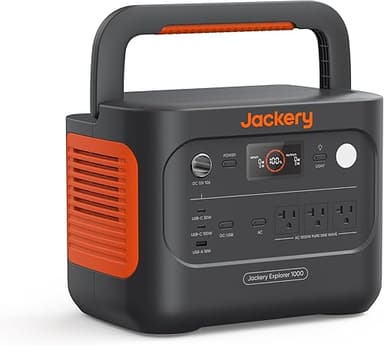
For users prioritizing AC power and modest USB needs, the Jackery Explorer 1000 v2 (last checked $499.00 · checked Oct 20, 2026 · see on Amazon) delivers 1,500W continuous AC (3,000W surge) from a 1,070Wh LiFePO4 pack. Its USB-C ports and 12V specs aren't published on the main page, so verify PD wattage in the manual if laptop charging is a primary use case.
FAQ
Why does my laptop charge slowly from the power station's USB-C port?
Your laptop likely requires more wattage than the USB-C port delivers. A 100W laptop plugged into a 60W USB-C PD port will charge at reduced speed, and may discharge during heavy use because the incoming 60W can't keep up with CPU and GPU load. Check your laptop's OEM charger wattage (printed on the power brick) and match it to a power station with equal or higher USB-C PD output. If the spec sheet doesn't list "PD 100W" explicitly, assume the port caps at 30–60W.
Can I run a 12V car fridge from the power station's car port?
Most power station 12V ports are fused at 10A (120W max). A typical compressor fridge draws 45–60W running but can spike to 120–150W on startup. If your fridge's startup surge stays under the port's limit, it will work. Also check if the port is regulated: unregulated ports drop from 13V to 11V as the battery drains, and many fridges have a low-voltage cutoff around 11.5–12V, causing early shutdowns even when the power station has 30–40% capacity left. Look for "regulated 12V" in the spec sheet if you plan extended fridge runtime.
Do all AC outlets on a power station give full power at once?
No. All AC outlets share one inverter. A power station rated 1,800W continuous delivers 1,800W total across all outlets combined, not per outlet. Plug a 1,200W appliance and a 900W appliance into two different outlets, and you've requested 2,100W — the inverter will shut down or trip to protect itself. Add the wattages of every AC device you plan to run simultaneously, and keep the sum under the station's continuous AC output rating.
What does PD mean on a power station spec sheet?
PD stands for Power Delivery, the USB-C fast-charging standard. A "USB-C PD 100W" port can deliver up to 100 watts to charge laptops, tablets, and phones at full speed. The PD wattage tier (30W, 60W, 100W, 140W) determines how fast your device charges. A USB-C port without "PD" listed usually defaults to 5V/3A (15W), which is fine for phones but too slow for laptops. Always verify the PD wattage number in the spec table before assuming fast laptop charging.
Does using multiple ports at once reduce each port's output?
It depends on the port type. USB-C and 12V ports typically have independent circuits with fixed per-port limits — using both at once doesn't throttle either, as long as you stay under each port's rated wattage. AC outlets share one inverter, so their combined load must stay under the total AC output rating. Some budget stations do share USB port budgets (e.g., "all USB ports combined: 100W"), which would throttle individual ports when multiple are in use. Check the manual for phrases like "shared USB output" or "total USB power."
How do I find per-port wattage limits if the product page doesn't list them?
Download the full user manual PDF from the manufacturer's support site. Per-port specs (USB-C PD wattage, 12V amperage, USB-A QC wattage) are usually in a table near the front or in the "Specifications" appendix. If the manual also omits them, contact the manufacturer's support team directly and ask for USB-C PD output, 12V port amperage and regulation status, and whether the 12V port is fused or circuit-breaker protected. Reputable brands will provide these numbers; if they won't, consider a different model with transparent specs.
The Port Wattage Bottom Line
A power station's port roster looks impressive until you check what each port actually delivers. USB-C without PD wattage might be 15W. A 12V socket is almost always capped at 120W and often unregulated. Four AC outlets share one inverter ceiling, not four independent 1,800W circuits.
Before you buy or pack, match your gear's real draw to the station's per-port limits. Verify USB-C PD wattage for laptop charging, confirm 12V amperage and regulation for fridges and inflatables, and add up AC loads to stay under the inverter's continuous rating. The port shape tells you nothing — the wattage spec tells you everything.
For generous AC headroom across mixed loads, the Anker SOLIX C1000 Gen 2 (last checked $699.99 · checked Oct 19, 2026 · see on Amazon) leads this class at 2,000W continuous. The EcoFlow River 2 Pro (last checked $719.00 · checked Oct 19, 2026 · see on Amazon) trades AC headroom (800W) for the lightest, most affordable entry point in our lineup. Whichever you choose: read the manual, check the per-port table, and test your loads at home before you depend on any port in the backcountry.